
A mail exchanger record (MX record) is a record in the Domain Name System that specifies a mail server responsible for accepting email messages. You can add an MX Record using the cPanel's Zone Editor option.
1. Log in to your cPanel account.
2. In the Domains section, click on Zone Editor.

3. Under Domains, you can see many options below Actions.

4. Click on the +MX Record, and a popup box will open. Please enter the required details in it.
Priority: The MX record is used for mail routing. It should have the lowest preference number, typically 0. You can use 0 for your mail routing record and 10 for the record validating that you own your domain.
Destination: Enter the domain name of your Mail Exchange. If you use an external mail server, enter the domain name of the external mail server. Alternatively, enter your local domain if you use a local mail server.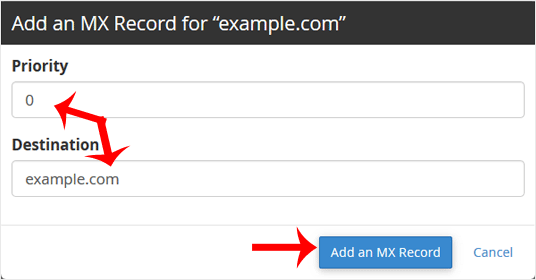
5. Now click on Add an MX Record.
If the record is added successfully, you will see a success message.
Note: It may take anywhere from 12 to 24 hours for the changes to take effect worldwide.


