Find Answers Fastin Our Knowledgebase

Explore our step-by-step guides, tutorials and expert tips to get the most out of your hosting experience. Our Knowledgebase is here for you 24/7, whether you're setting up a domain, managing WordPress, or troubleshooting.

knowledegebase

How to Enable Apache SpamAssassin and SpamBox in cPanel


Apache SpamAssassin is a mail filter that identifies spam. An intelligent email filter uses various tests to identify unsolicited bulk email, more commonly known as spam. These tests examine email headers and content to classify emails with advanced statistical methods.


1. Log in to your cPanel Account.


2. In the Email section, click on Spam Filters.

 

3. Toggle Process New Emails and Mark them as Spam to enable it. If the knob/toggle is greyed out, this indicates that Apache SpamAssassin is disabled.



4. Enable SpamBox by clicking on Move New Spam to a Separate Folder (Spam Box).
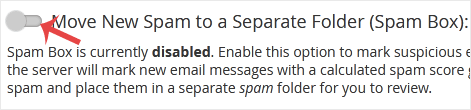


From now on, spam messages with a spam score of 5 or higher will be automatically removed by Spam Assassin.


Was this answer helpful?

« Back

Explore Latest News

Explore product announcements, hosting tips, security news, and digital trends to help you grow your online presence. Whether you're a developer, business owner, or startup, our blog keeps you ahead of the curve.

Our Partners

The delivery of secure, high-performance hosting worldwide is our mission, and our partners play a vital role in making it happen.

cloudlinux
cpanel
digicert
immunify360
litespeed
softaclus
tripleace