
BoxTrapper requires all email senders not on your Whitelist to respond to verification emails. It protects you from spam.
If you want to get rid of unwanted emails, enable Boxtrapper either on all emails or just selected emails and configure it.
1. Log in to your cPanel Account,
2. In the Email section, click on BoxTrapper.

3. On the BoxTrapper's page, you see a list of your emails under the Account heading and the status of BoxTrapper under the Status heading. Choose Manage.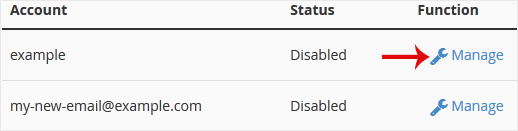
4. On the BoxTrapper's Manage page, if the status is Disabled, Choose Enable.
How to Enable BoxTrapper in cPanel
0
Was this answer helpful?
Related Articles
How to Edit an Account Level/Global Email Filter in cPanel
1. Log in to your cPanel account.2. In the Email section, click on Global Email Filters. 3. Under...
How to Create a "User Level Email Filter" in cPanel
It is hard to stop spam email entirely but you can filter it, discard it, deliver it to the...
How to Edit "User Level Email Filter" in cPanel
1. Log in to your cPanel account. 2. In the Email section, click on Email Filters. 3. Under...
How to Enable Apache SpamAssassin and SpamBox in cPanel
Apache SpamAssassin is a mail filter that identifies spam. An intelligent email filter uses...
How to Delete "User Level Email Filter" in cPanel
1. Log in to your cPanel account.
2. In the Email section, click on Email Filters. 3. Under...


